AgentSOAR can now see your AWS threat landscape. This post covers the GuardDuty integration: four agent-callable tools, an EventBridge ingestion pipeline, and the design decisions along the way.
AWS prerequisites
The Blanxlait org has four accounts: management (myMainAWSAccount), Security,
AI (where AgentSOAR is deployed), and Log Archive. All of the setup below was
performed interactively via the AWS CLI — nothing is baked into the CDK stack because
these are one-time org-level configurations that live outside any single application’s
lifecycle.
1 — Enable GuardDuty org-wide
GuardDuty must be enabled in every account/region you want findings from. The recommended pattern for an AWS Organization is a delegated administrator account — a dedicated Security account that aggregates findings from all members.
The Blanxlait org already had the Security account designated as the GuardDuty delegated admin and GuardDuty enabled in the Security account with a detector. What was missing was member enrollment and auto-enable for future accounts.
If you’re starting from scratch, run these in the management account first:
aws organizations enable-aws-service-access \
  --service-principal guardduty.amazonaws.com \
  --profile management-admin

aws guardduty enable-organization-admin-account \
  --admin-account-id <SECURITY_ACCOUNT_ID> \
  --profile management-admin
Then in the Security (delegated admin) account, enable auto-enrollment so every current and future member account gets GuardDuty enabled automatically:
DETECTOR=$(aws guardduty list-detectors --query 'DetectorIds[0]' --output text)

# Auto-enroll future accounts
aws guardduty update-organization-configuration \
  --detector-id $DETECTOR \
  --auto-enable-organization-members ALL

# Enroll existing accounts (one-time; auto-enable only covers future accounts)
aws guardduty create-members \
  --detector-id $DETECTOR \
  --account-details \
    AccountId=<AI_ACCOUNT_ID>,Email=<email> \
    AccountId=<LOG_ACCOUNT_ID>,Email=<email> \
    AccountId=<MGMT_ACCOUNT_ID>,Email=<email>
With this in place, findings from every member account aggregate to the Security
account. The get_guardduty_findings Lambda must run there (or use cross-account
API calls) to see the full picture — see the section below on cross-account
EventBridge if AgentSOAR lives in a different account.
2 — Finding aggregation across regions
GuardDuty findings are regional. If you run workloads in multiple regions you have two options:
-
GuardDuty multi-region aggregation (recommended) — designate one region as the aggregation region in the delegated admin account. Findings from all linked regions are replicated there and the Lambda only needs to query one region.
# Enable finding aggregation in us-east-1 (run in the delegated admin account) aws guardduty create-finding-aggregation-configuration \ --detector-id <DETECTOR_ID> \ --region us-east-1 -
Query each region separately — pass an explicit
regionparameter toget_guardduty_findingsfor each region of interest. More API calls, but no additional setup.
3 — Cross-account EventBridge forwarding (delegated admin pattern)
This is the most important setup step if AgentSOAR is deployed in a different account than your GuardDuty delegated admin (Security) account.
Why it matters: GuardDuty publishes GuardDuty Finding events to EventBridge in
the account where findings are aggregated — the Security account. The
GuardDutyFindingsRule created by AgentSOAR’s CDK stack lives in the AgentSOAR (AI)
account and will never fire unless findings are forwarded across accounts first.
The pattern:
Security account                          AgentSOAR (AI) account
────────────────────────────────          ──────────────────────────────
GuardDuty Finding event                   Default event bus
  │                                         ↑  resource policy grants
  ▼                                         │  Security account PutEvents
EventBridge rule                            │
  forward-guardduty-to-agentsoar ──────────►│
  via EventBridgeCrossAccountToAgentSOAR    │
                                            ▼
                                       GuardDutyFindingsRule  (CDK-managed)
                                            │
                                            ▼
                                       GuardDuty tool Lambda
These three resources were created once via CLI — they live outside the CDK stack because they span account boundaries.
Step 1 — Resource policy on the AgentSOAR event bus (run in the AI account):
aws events put-permission \
  --event-bus-name default \
  --action events:PutEvents \
  --principal <SECURITY_ACCOUNT_ID> \
  --statement-id AllowGuardDutyForwardingFromSecurity \
  --region us-east-1 \
  --profile blanxlait-ai
Step 2 — IAM role in the Security account for EventBridge to assume when forwarding:
# Trust policy
aws iam create-role \
  --role-name EventBridgeCrossAccountToAgentSOAR \
  --assume-role-policy-document '{
    "Version": "2012-10-17",
    "Statement": [{
      "Effect": "Allow",
      "Principal": {"Service": "events.amazonaws.com"},
      "Action": "sts:AssumeRole"
    }]
  }'

# Permissions policy
aws iam put-role-policy \
  --role-name EventBridgeCrossAccountToAgentSOAR \
  --policy-name PutEventsToAgentSOAR \
  --policy-document '{
    "Version": "2012-10-17",
    "Statement": [{
      "Effect": "Allow",
      "Action": "events:PutEvents",
      "Resource": "arn:aws:events:us-east-1:<AI_ACCOUNT_ID>:event-bus/default"
    }]
  }'
Step 3 — Forwarding rule in the Security account:
aws events put-rule \
  --name forward-guardduty-to-agentsoar \
  --event-pattern '{"source":["aws.guardduty"],"detail-type":["GuardDuty Finding"]}' \
  --state ENABLED \
  --region us-east-1

aws events put-targets \
  --rule forward-guardduty-to-agentsoar \
  --region us-east-1 \
  --targets '[{
    "Id": "AgentSOARDefaultBus",
    "Arn": "arn:aws:events:us-east-1:<AI_ACCOUNT_ID>:event-bus/default",
    "RoleArn": "arn:aws:iam::<SECURITY_ACCOUNT_ID>:role/EventBridgeCrossAccountToAgentSOAR"
  }]'
Once all three are in place, findings land on the AgentSOAR default bus within
seconds. The GuardDutyFindingsRule CDK construct needs no changes.
4 — IAM for cross-account API calls
The get_guardduty_findings Lambda calls the GuardDuty API. If findings are
aggregated in the Security account, the Lambda must either:
- Run in the Security account — simplest if you’re willing to deploy part of AgentSOAR there.
- Assume a cross-account role — add
sts:AssumeRoleto the Lambda’s execution role and target a role in the Security account that has the GuardDuty read permissions. Pass the assumed credentials when constructing the boto3 client.
Both patterns are supported. See the cross-account role assumption section below for the implementation used in Blanxlait’s setup.
What was added
Five gateway tools (gateway/tools/guardduty_tool/)
| Tool | What it does |
|---|---|
get_guardduty_findings | List active (non-archived) findings filtered by severity, region, and account |
describe_guardduty_finding | Human-readable explanation: type, severity, affected resource, actor geo |
archive_guardduty_finding | Suppress confirmed false positives or remediated findings |
triage_guardduty_finding | 4-step automated playbook: classify → enrich → risk score → remediation steps |
list_guardduty_findings_since | Query the local DynamoDB store for findings ingested in the last N hours |
All five are backed by a single Lambda (guardduty_lambda.py) that the AgentCore
Gateway routes to via a CfnGatewayTarget.
EventBridge ingestion and autonomous triage
An EventBridge rule on aws.guardduty / GuardDuty Finding feeds new findings
directly into the Lambda in near-real time. The handler detects EventBridge
invocations by checking event["source"] == "aws.guardduty" and routes them to a
separate _handle_eventbridge() path — EventBridge does not set client_context,
so it must be dispatched before the Gateway tool path is attempted.
When a finding arrives, _handle_eventbridge does three things:
- Stores the finding summary in a DynamoDB table (
AgentSOAR-guardduty-findings) with a 30-day TTL and a time-based GSI for range queries. - Invokes the AgentCore Runtime asynchronously with a triage prompt, so the agent runs the 4-step playbook without any human trigger.
- Returns 200 immediately — the agent invocation runs in a daemon thread within the Lambda’s execution window.
The DynamoDB store powers list_guardduty_findings_since, which lets the agent
answer “what came in while I was away?” without hitting the live GuardDuty API.
Design decisions
Single Lambda, multiple tools. GuardDuty’s APIs are cohesive. Splitting them across four Lambdas would multiply cold-start overhead and IAM complexity for no gain.
Only active findings. get_guardduty_findings filters service.archived = false
so the agent never acts on already-suppressed findings.
ArchiveFindings on a separate IAM statement. The read actions (ListDetectors,
ListFindings, GetFindings) and the write action (ArchiveFindings) are in
separate IAM policy statements scoped to arn:aws:guardduty:*:<account>:detector/*.
This makes it easy to remove write access independently if needed, and avoids the
overly-broad resources: ["*"] pattern.
Tool description warns before archiving. The archive_guardduty_finding tool
description explicitly marks the action as destructive so the agent’s reasoning loop
treats it with appropriate caution.
Triage output example
# Automated Triage Report — SSH brute force attack detected
Finding ID: abc123  |  Account: 123456789012  |  Region: us-east-1

## Step 1 — Classification
Finding type : UnauthorizedAccess:EC2/SSHBruteForce
Severity     : MEDIUM (5.0)

## Step 2 — Resource Enrichment
Resource type: Instance
  Instance ID : i-0abc123 (t3.micro, running)
Actor IP : 1.2.3.4 (Amsterdam, Netherlands / Example ISP)
Occurrences  : 3

## Step 3 — Risk Assessment
Adjusted risk score : 5.5 / 10
Risk factors        : repeated occurrences (>5)

## Step 4 — Recommended Actions
  1. Review the affected resource configuration and recent CloudTrail events.
  2. Verify the activity is authorized; escalate if it cannot be confirmed.
  3. Apply least-privilege principles to the implicated IAM entity.
End-to-end validation
The full pipeline was tested against live AWS infrastructure:
Lambda handler — directly invoked with an EventBridge-shaped payload; correctly
detected source: aws.guardduty and routed to _handle_eventbridge rather than
attempting to read client_context.
Cross-account EventBridge forwarding — verified independently by firing a
custom-source event on the Security account’s default bus and confirming it arrived
on the AgentSOAR account’s default bus within ~5 seconds, with account: 429971481640 (Security) preserved in the envelope.
Real sample findings — create-sample-findings was called on the Security
account detector with two finding types: UnauthorizedAccess:EC2/SSHBruteForce and
Recon:EC2/PortProbeUnprotectedPort. Both appeared in CloudWatch logs confirming the
full path:
GuardDuty (Security account)
  → EventBridge forward-guardduty-to-agentsoar rule (~4 min delay for sample findings)
  → AgentSOAR account default bus
  → GuardDutyFindingsRule
  → Lambda (6 ms execution, logged finding id + type + severity)
One thing to note: sample findings take ~4 minutes to generate an EventBridge
event after create-sample-findings returns. Real findings are faster. Don’t mistake
silence for a broken pipeline — check CloudWatch metrics before debugging the wiring.
Interactive triage via the UI — with the Gateway tools wired up and the correct runtime ARN deployed to Amplify, the agent can already answer GuardDuty questions interactively. Asking “do we have any GuardDuty findings?” returned 10 live org-wide findings — 1 CRITICAL, 4 HIGH, 5 MEDIUM — pulled from the Security account’s delegated admin detector via the cross-account role:
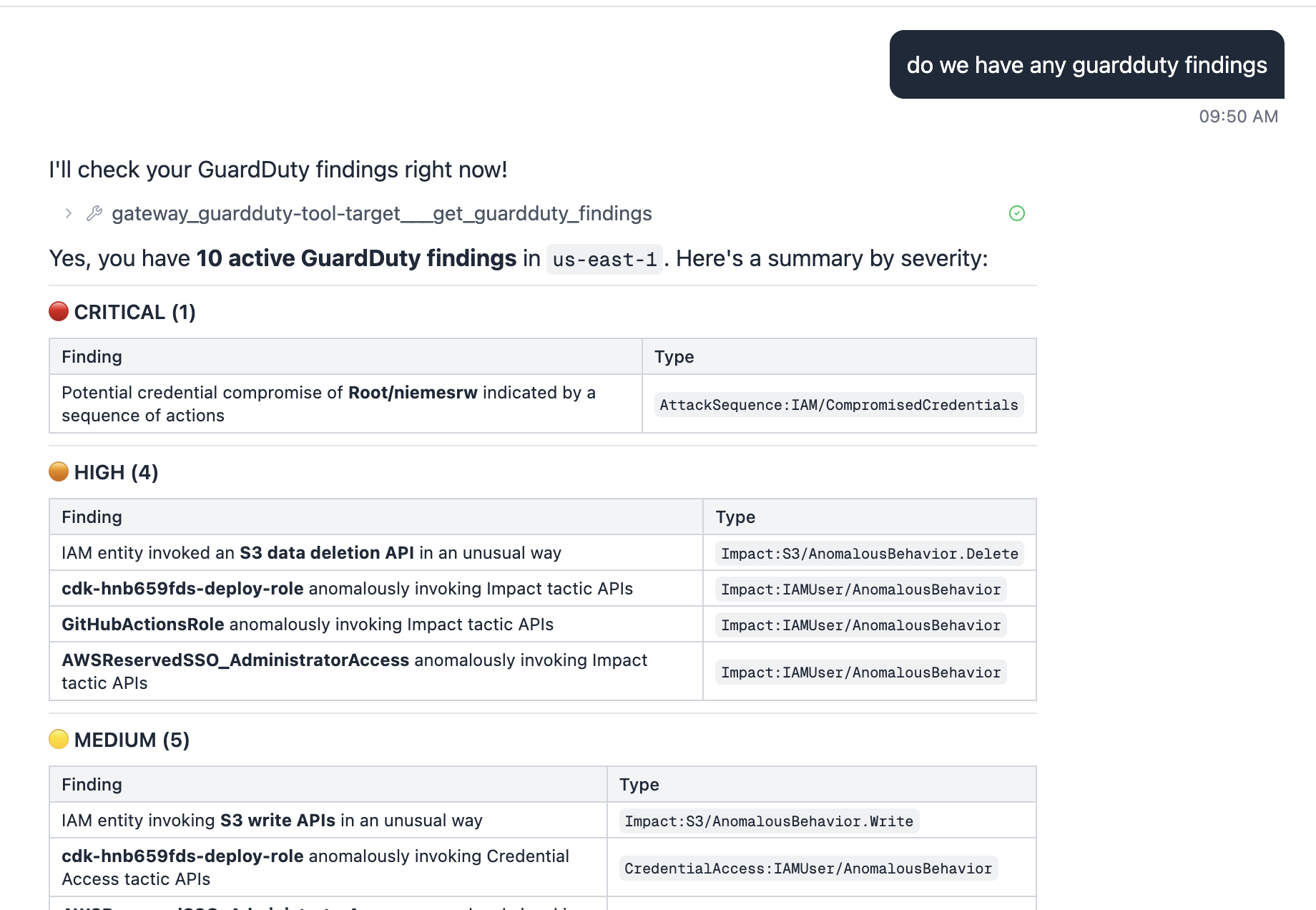
The CRITICAL finding (AttackSequence:IAM/CompromisedCredentials) and the HIGH S3
deletion API anomaly are real behavioral detections against live org activity, not
sample data.
What’s next
- AG-UI streaming triage — surface the 4-step triage playbook as a real-time
AG-UI stream so each step appears as the agent reasons, rather than waiting for
the full report. When
_handle_eventbridgeinvokes the agent autonomously, push the stream to a findings panel in the UI. - Extend triage playbooks with account-specific runbooks loaded from SSM.
Cross-account role assumption pattern
A key architectural decision was where to run the GuardDuty Lambda. The options were:
- Run Lambda in the Security account — direct access, but splits AgentSOAR’s infrastructure across accounts and turns the Security account into an application host.
- Cross-account role assumption (STS AssumeRole) — Lambda stays in the AI account, assumes a read-only role in the Security account just for data access.
We chose Option B. The Security account owns the data; AgentSOAR owns the automation. IAM bridges the gap. This is the right pattern for any AWS service where data lives in a different account than the application consuming it.
The reusable helper
_get_client(service, region, role_arn=None) in guardduty_lambda.py is designed to
be copied to any future Lambda tool group:
def _get_client(service: str, region: str, role_arn: str | None = None) -> Any:
    if role_arn:
        creds = boto3.client("sts").assume_role(
            RoleArn=role_arn,
            RoleSessionName="agentsoar",
            ExternalId="agentsoar",   # confused-deputy protection
            DurationSeconds=900,
        )["Credentials"]
        return boto3.Session(
            aws_access_key_id=creds["AccessKeyId"],
            aws_secret_access_key=creds["SecretAccessKey"],
            aws_session_token=creds["SessionToken"],
        ).client(service, region_name=region)
    return boto3.client(service, region_name=region)
When SECURITY_ACCOUNT_ROLE_ARN is not set the Lambda falls back to its own
execution role — same code works in single-account and multi-account deployments.
The target account role
One IAM role per target account (AgentSOARCrossAccountRole), created once via CLI:
# Trust policy — AI account with ExternalId guard
aws iam create-role \
  --role-name AgentSOARCrossAccountRole \
  --assume-role-policy-document '{
    "Version": "2012-10-17",
    "Statement": [{
      "Effect": "Allow",
      "Principal": {"AWS": "arn:aws:iam::<AI_ACCOUNT_ID>:root"},
      "Action": "sts:AssumeRole",
      "Condition": {"StringEquals": {"sts:ExternalId": "agentsoar"}}
    }]
  }'

# Add permissions for the services AgentSOAR needs to read
aws iam put-role-policy \
  --role-name AgentSOARCrossAccountRole \
  --policy-name GuardDutyRead \
  --policy-document '{
    "Version": "2012-10-17",
    "Statement": [{
      "Effect": "Allow",
      "Action": ["guardduty:ListDetectors","guardduty:ListFindings",
                 "guardduty:GetFindings","guardduty:ArchiveFindings"],
      "Resource": "arn:aws:guardduty:*:<SECURITY_ACCOUNT_ID>:detector/*"
    }]
  }'
Adding CloudTrail, Security Hub, or any other service to the pattern is two steps:
add the actions to the role policy, add the corresponding _get_client call in the
Lambda.
What the smoke test returned
With cross-account role assumption in place, get_guardduty_findings returned 17
org-wide findings from the Security account’s delegated admin detector — including
real behavioral detections against CDK deploy roles and SSO sessions, plus the sample
findings generated earlier. The full triage report ran successfully against a live
finding in under 200ms end-to-end through the Gateway.